
- ProRetis Schul- verwaltung
- C³ Clareon Contact Center
- CIS
- Dienst- leistungen
-
Impressum
Clareon GmbH
Ettlingen
Info@Clareon.de
CIS
With CIS the Clareon GmbH provides a call center integration platform, that supplies itself with a variety of data sources and used this overall - e. g. for daily, weekly or monthly reports or for overall activities such as employee scheduling.
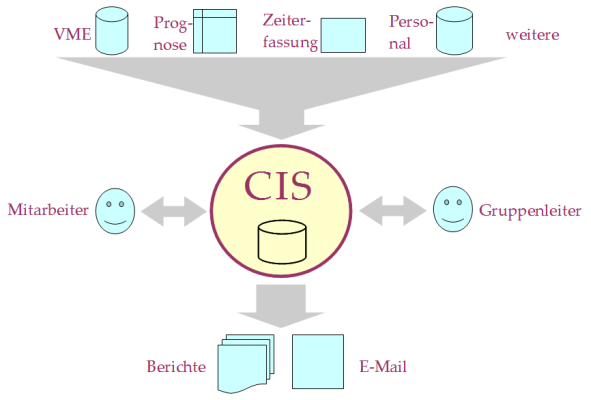
CIS is composed of a variety of modules, each of which can be adapted to the needs of users.
With the help of this module the personnel administration is able to manage applications for employment, new hire, modification and leaving of employees for several business units.
Various print documents, e. g. address lists, salary surveys, applicant, birthday and anniversary lists and also entry and exit surveys may be generated on a date or period basis.
The SU-recording module is used to record the services yielded by the individual employee. Examples of service units (SU) are:
The recorded SUs form the basis for the invoice to the respective clients. They are also the basis for measuring performance of employees.
The module SU-evaluation reports on the work done in the call center. These are the services provided by the employees and also activities done for a particular client.
Authorized team leaders or the call center managers can create daily, weekly and monthly reports that represent the work of an employee, the work of the call center for a particular client or the work of the entire call center.
In a sales call it is detected that the customer should receive a short text message (letter). Currently the complete customer address for the letter is to be entered. The text of the letter is selected from a set of templates.
For each client a master copy is stored as a background for the letters (printing is done on plain paper).
The customers, who do not want to receive a catalog, are stored.
At the end of each day a list of all so-stored customer is created for the client and sent out by e-mail (process is scheduled automatically).
A customer calls in to participate in a competition. The customer's address and the answer to the "riddle questions" will be entered in order to later deliver the possible prize.
The team leaders or the call center managers are allowed to create new competitions. An automatic sequence will check daily whether the end of the competition is reached and will find out the winners.
In a sales call it is discovered that the catalog contains a faulty product code. The faulty product code (including page, offer, catalog) is stored.
At the end of each day a list of all such stored product codes will be created for the client and sent out by e-mail (only if there are new cases during this day). This process is scheduled automatically.
If several employees find the same faulty product code, it will be mentioned only once in the list for the client and only once per catalog.
The client provides an Excel spreadsheet with the customers, to be called for a reminder (phone number, name, customer number, address, total).
Especially qualified employees keep track on these calls. For each call (try) the result must be recorded and possible resubmission at certain times (such as 5 pm) must be fixed. Unfinished cases will be presented again.
For customer retention reasons some clients maintain clubs where customers may become a member. This includes the management of customers, who are members of a club. The participation of special club activities (magazine delivery, world travel, and many more) is also managed. New club memberships, modifications and cancellations are recorded along with the employee who acquired the customer as a member for the club (commission).
The module “breaks” is the detailed planning of breaks by the employees at the operating day. Each employee sees when the other employees will have their break, e. g. to join them.
There are several breaks (morning, noon, afternoon, evening). Within each break, there are time slots that may overlap. It is adjustable how many employees may have their break simultaneously.
The module “planing” does the scheduling of employees using
In addition, an updated daily forecast for the current day is available (the basis of an "intraday" follow-up planing).
The Planing module creats for each employee a weekly plan with the individual working hours and sents it by e-mail. The planning should achieve the following targets:
Services
Of course you can contract with us about service and maintenance for your system.

 english
 français
 deutsch
 Human Resources